
Dimensions, Bleed, and Safe Zones
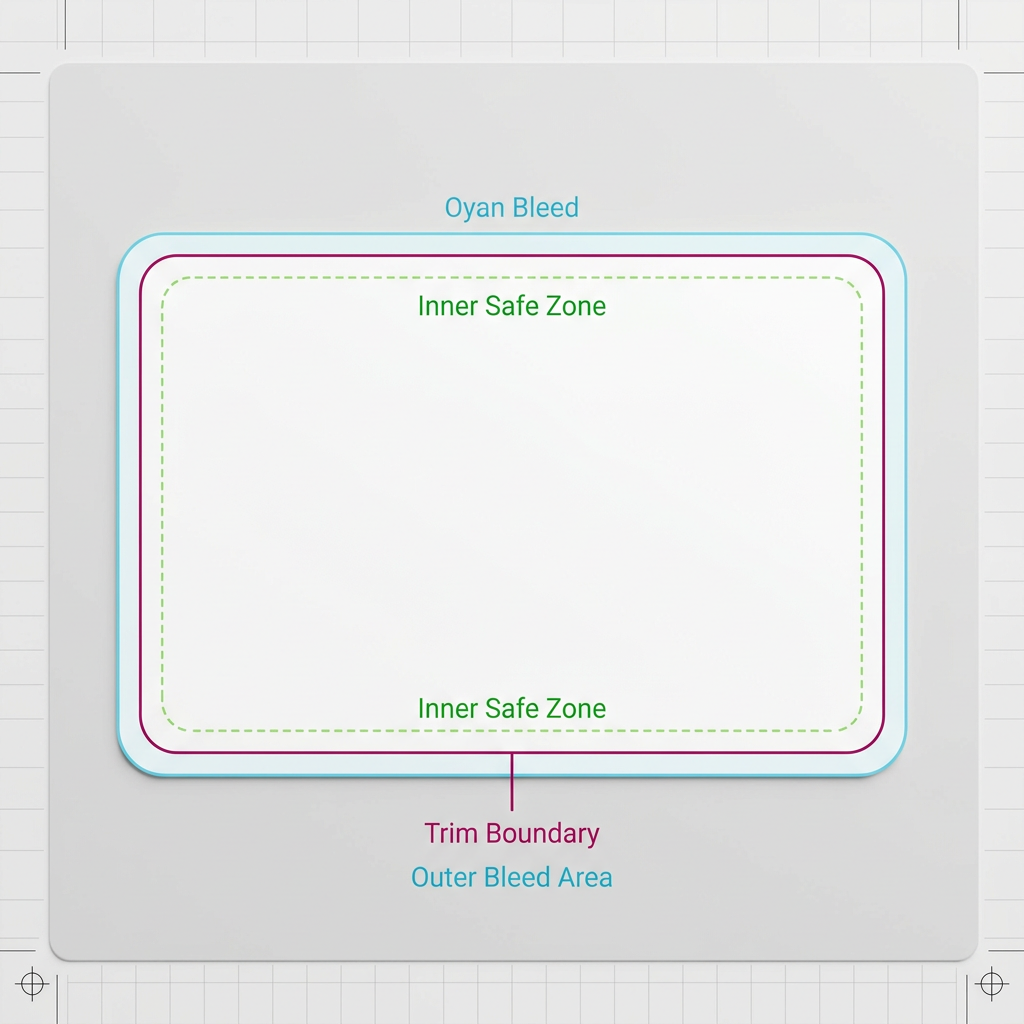
Set the document to the exact finished card dimensions at 100% scale. Extend edge-to-edge artwork into the printer’s required bleed area and keep text, logos, borders, and other essential elements within the specified safe zone. Use an approved dieline for rounded corners, shaped cards, holes, folds, or specialty cuts.
CMYK Color Preparation
Convert artwork using the printer’s requested CMYK profile and review colors that may change from RGB. Confirm total ink limits, black builds, and any spot-color requirements before export.
Image Resolution and Graphics
Check raster images at their final placed size. A target of 300 pixels per inch is suitable for many card projects, subject to the printer’s specifications. Use vector graphics where practical and inspect transparency effects in the exported file.
Fonts and File Formats
Embed fonts or outline final text when required, while retaining an editable source file. Export a print-ready PDF with the correct dimensions and bleed. Use clear file names and provide an unambiguous front-to-back sequence.
Proof Review and Approval
Review the proof for dimensions, sequence, content, image quality, finishing guides, and front-to-back alignment. Clarify whether the proof represents layout only or is intended as a color reference before approving production.
Final Print-Ready Checklist
Before submission, verify dimensions, bleed, safe zones, color settings, effective resolution, fonts, PDF format, card order, dielines, and proof approval against the supplier’s current artwork guidelines.
FAQ
How much bleed should custom card artwork include?
A common requirement is 3 mm or 0.125 inches on each side, but bleed specifications vary. Use the amount shown in the printer’s artwork template and extend all edge-to-edge backgrounds and images fully into that area.
Should custom card artwork be supplied in RGB or CMYK?
Commercial printing generally requires CMYK artwork, although the exact workflow and color profile depend on the printer. Convert using the supplier’s recommended profile and review any visible color changes before approval.
What image resolution is suitable for card printing?
For many projects, raster images should have an effective resolution of approximately 300 pixels per inch at final size. Requirements may differ for line art, large-format cards, or specialized production methods.
What is the preferred file format for print-ready card artwork?
A print-ready PDF is commonly preferred because it preserves page size, bleed, vector elements, images, and embedded fonts. Follow the printer’s requested PDF standard, page order, and naming convention.
Does a digital proof guarantee an exact printed color match?
Not necessarily. Some digital proofs are intended primarily to confirm layout, content, and positioning. Ask the printer whether the supplied proof is color-managed and suitable for contract color approval.
Request a quote / Get a sample